What Is a Heat Press and How Does It Work?
A heat press applies heat, pressure, and time to bond a transfer to an item. Place the design and material between the heated plate and base, then follow the transfer maker's instructions.
On this page (7 sections)
A heat press applies heat, pressure, and time to bond a transfer to an item. Place the design and material between the heated plate and base, then follow the transfer maker's instructions.
Unlike an iron, a press is built to apply heat across a defined area with repeatable settings. The right machine depends on what you plan to decorate, how often you'll use it, and how much workspace you have.
What does a heat press do?
A heat press transfers a design onto a compatible surface by applying heat and pressure for a set time. The heat activates the transfer material, while pressure helps it make contact with the item.
The press doesn't create the design on its own. You need a transfer made for your chosen material, such as heat transfer vinyl (HTV) or a sublimation transfer, and the instructions for that transfer.
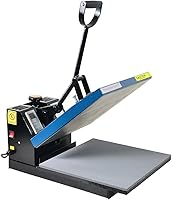
A basic press has a heated plate, often called a platen, and a lower surface that supports the item. Many machines let you set temperature and time; some also let you adjust pressure or automate part of the pressing process.
For project ideas and a closer look at machine styles, see our heat press guide.
How does a heat press work?
You set the temperature and time, position the item and transfer, then press them together as directed. After the timer ends, open the press and handle the transfer according to its instructions.
A typical project follows this order:
- Check that the transfer is compatible with the item.
- Set the recommended time and temperature.
- Prepare the item as directed, including any pre-press step.
- Position the transfer and any protective layer the instructions call for.
- Close or start the press for the specified time.
- Remove the transfer backing when its instructions say to do so.
Don't guess at settings or treat one material's instructions as universal. HTV, sublimation, and other transfers can need different conditions.
Our guide to HTV heat press temperature and time covers one common method, while the sublimation temperature and time guide covers another.
Why do heat, pressure, and time all matter?
Heat, pressure, and time work together, so changing one can affect the result. Too little or uneven contact may leave part of a design unattached, while unsuitable settings may harm a transfer or item.
The transfer maker's instructions are the best starting point. Follow them for the material, temperature, pressure, timing, and whether the backing should be peeled while warm or cool.
What are the main types of heat press?
The main styles differ in how the heated plate moves and how much of the pressing task they handle for you. A handheld press is compact, while clamshell, swing-away, and automatic machines use a fixed base and heated platen.
- Handheld presses are portable and suit people who want to work on projects without a large machine. You hold the heated plate against the item, so even coverage depends on how you move and press it.
- Clamshell presses open and close on a hinge. They take up less side-to-side room, but the upper plate moves through the space above the lower platen.
- Swing-away presses move the upper plate aside before you position a project. This can give you a more open work area, though you'll need room for the plate to swing.
- Automatic presses handle part of the closing or release process. Features vary, so check what is automated and what you still need to do.
- Multi-function presses use interchangeable attachments for different kinds of items. Check which attachments are included and whether they suit your intended projects.
Compare the tradeoffs in our clamshell vs swing-away heat press guide. If you're new to pressing, our heat press for beginners guide explains which features to consider before choosing a style.
Which heat press features should you compare?
Start with the project size, material, and working space you have. Then compare the pressing area, controls, pressure adjustment, and whether the machine's design suits your workflow.
A larger pressing area can accommodate bigger designs, but the machine itself may need more room. A smaller press can suit simple projects, though you may need to reposition it for a design that exceeds its heated surface.
Controls also vary. A digital display may let you set time and temperature, while other machines include a heat guide or preset modes.
If you want to understand common controls, read what the controls on a digital heat press do.
HTVRONT's press has 4 fast modes, 2 custom modes, and an automatic mode. Its drawer-style board keeps the work area separate from the heating plate.
The Cricut EasyPress SE has a ceramic-coated plate and controlled temperatures up to 400°F. It's compatible with major brands of HTV, Infusible Ink, and sublimation products.
The Fancierstudio press has electronic time and heat controls and an upward-opening design. Allow room for it when planning your work area.
The Slendor set includes a 12 x 15 in shirt press, a hat press, a tumbler press, and 2 plate presses. Choose it if those extra formats fit the projects you expect to make.
Can you use one press for every transfer?
No single set of settings works for every transfer and material. The press supplies heat and pressure, but the transfer and item determine how you should use them.
HTV uses a cut vinyl design, while sublimation uses a printed transfer and is meant for compatible materials.
These methods also differ in how their transfers are made and applied. Our HTV vs sublimation comparison can help you choose a method.
Check that the transfer is designed for the surface you're decorating. Fabric blends, coatings, and item shapes can all affect whether a project is suitable for your press.
How do you use a heat press safely?
Keep hands clear of the heated plate and follow the machine and transfer instructions. Set up the press on a stable surface with enough open space to position items without reaching over hot parts.
Use the recommended temperature and time rather than raising them to compensate for a transfer that isn't adhering. Let the press cool as its instructions direct before storing it, and keep children and pets away while it's in use.
A pressing pillow or protective sheet can help with some projects, but only use one if the transfer and machine instructions allow it. For a shirt walkthrough, follow how to heat press a shirt step by step.
Is a heat press right for your projects?
Choose a heat press if you want a dedicated tool for applying transfers with set heat and timing. A handheld model can fit occasional projects and a smaller workspace; a full machine may suit larger designs or a regular craft routine.
Match the machine to what you'll actually make. Compare its working area and style, confirm that your transfer materials are compatible, and check that you have room to use it safely.
If you're still weighing styles and sizes, start with the heat press guide. Then choose settings from the transfer maker's instructions for each project.
Frequently asked questions
What is a heat press used for?
A heat press applies heat and pressure for a set time to attach a transfer to fabric or another compatible surface. Common projects include shirts, bags, and home crafts.
The right transfer, material, temperature, pressure, and timing depend on the materials you use, so follow their instructions.
Is a heat press better than an iron?
A heat press gives you a set temperature, a timed press, and a broad heated surface, which can make repeat projects easier to control. An iron can work for occasional small crafts, but it may not apply the same steady pressure or cover a large design evenly.
Match the tool to your project and transfer instructions.
What temperature should I use on a heat press?
There isn't one temperature for every project. The correct setting depends on the transfer type and the material receiving it, as well as the transfer maker's instructions.
Check the recommended temperature and time before pressing, and use a suitable test material if the instructions call for it.
Do you need a computer to use a heat press?
No. A computer isn't needed to operate a heat press or apply a ready-to-use transfer.
You may need a computer or cutting machine to make a design, depending on how you create the transfer, but those are separate from the press itself.