How Much Does a Cricut Heat Press Cost?
A Cricut heat press costs more than a craft iron but less than a commercial press. Expect budget money for a small manual EasyPress, mid-range money for a larger EasyPress, and premium money for an automatic press like the AutoPress 2.
On this page (10 sections)
- What drives the price of a Cricut heat press?
- How much is the Cricut EasyPress SE 9x9?
- How much is the Cricut EasyPress SE 12x10?
- How much is the Cricut AutoPress 2 15x15?
- Which size should you buy for your projects?
- What else should you budget for?
- Do you need a separate mat and accessories?
- How does pressure affect what you pay for?
- How much is a Cricut heat press for a small business?
- The bottom line on Cricut heat press cost
A Cricut heat press costs more than a craft iron but less than a commercial shop press. Expect budget money for a small manual EasyPress, mid-range money for a larger EasyPress, and premium money for an automatic press like the AutoPress 2.
Knowing how much is a Cricut heat press before you buy helps you match the press to your projects. The plate size, the pressure system and the controls drive the price far more than the color or the handle.
What drives the price of a Cricut heat press?
Plate size and pressure control set the price. A bigger ceramic plate costs more to build, and a press that measures or automates pressure costs more than a handheld unit.
The EasyPress line is a handheld style. It heats through a ceramic-coated plate and relies on you to apply pressure with the handle.
That simple design keeps the cost down while still reaching temperatures up to 400°F.
Automatic presses add motors, pressure settings and hands-free operation. The AutoPress 2 is rated up to 220 lbs of pressure and 410°F, and its extra-large 15x15 plate pushes it into premium territory.
It also adds features the manual presses don't have, like four customizable presets and Bluetooth control.
The brand matters less than the format here. All three presses carry the Cricut name and a 1 year limited warranty, so the gap in cost comes from how the press works, not who makes it.
If you're new to heat transfer, our explainer on what is a heat press covers how these machines differ from an iron.
How much is the Cricut EasyPress SE 9x9?
The 9x9 is the budget-friendly entry point. It's the smallest and least expensive Cricut press, aimed at everyday projects like T-shirts, totes and baby clothes.
The ceramic plate delivers dry, edge-to-edge heat and reaches 400°F. The handle is easy to hold, so you can press even pressure across a standard adult tee.
It's portable and light, which makes it easy to store between sessions. It works with iron-on vinyl, Infusible Ink and sublimation products, so you aren't locked into one material.
The trade-off is coverage. A 9x9 plate fits most T-shirts and small blanks, but a wide design on a sweatshirt or a large blanket may need two presses.
How much is the Cricut EasyPress SE 12x10?
The 12x10 sits in the mid-range. It's the larger version of the same EasyPress design, and the extra plate area covers bigger projects in a single press.
The 12x10 handles adult sweatshirts, blankets and pillows that a 9x9 can't cover well. It still reaches 400°F through a ceramic-coated plate, and it stays portable enough to move around.
This is the size many crafters land on for a home setup. It covers most everyday blanks without the bulk or the price of an automatic press.
The trade-off is storage and cost. It takes more shelf space than the 9x9, and you pay more for the larger plate.
Check your largest blank before choosing this size.
How much is the Cricut AutoPress 2 15x15?
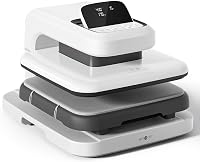
The AutoPress 2 is the premium option. It's an automatic press with a 15x15 plate, adjustable pressure and hands-free operation, so it costs more than any EasyPress.
The 15x15 plate handles extra-large T-shirts, sweatshirts and blankets. It presses up to 220 lbs of pressure and 410°F, and it auto-adjusts for thick materials up to 1.8 in.
Auto Mode runs the press hands-free, which saves effort on long sessions or batches. Bluetooth lets you send settings from the Cricut Heat Guide straight to the press.
Four customizable presets mean you can save your go-to settings for different materials.
The trade-off is size and price. It's a heavier, stationary machine that needs a dedicated spot on a table.
For occasional single projects, a manual EasyPress does the basic job for less.
What does the AutoPress 2 add over the EasyPress?
The AutoPress 2 adds features the EasyPress models don't offer. The biggest is hands-free Auto Mode, so the press does the pressing instead of your arm.
It also measures pressure for you, up to 220 lbs. An EasyPress leaves pressure to your hand, which is fine for a few shirts but gets tiring on a long batch.
The AutoPress 2 also has a safety base, a full slide-out tray and an auto-off feature. Those extras are part of what the premium price covers.
Cricut lists them as protection features for the press.
The EasyPress models keep it simple. You set the temperature from the Heat Guide and press by hand.
That's why they cost less.
Which size should you buy for your projects?
Buy the smallest plate that covers your largest design. A plate that's too small forces repeat presses and risks uneven results, while a plate that's too big costs more and takes more room.
| Your main projects | Plate size to buy |
|---|---|
| T-shirts, totes, baby clothes | 9x9 |
| Adult sweatshirts, blankets, pillows | 12x10 |
| Bulk orders, thick materials, extra-large blanks | 15x15 |
Measure the widest design you plan to press. If it's under 9 in, the 9x9 is enough.
Anything wider needs the 12x10 or the AutoPress 2.
Households that press in batches or make items to sell should weigh the AutoPress 2 against its higher cost. Our comparison of Cricut EasyPress vs heat press helps you decide between manual and automatic styles.
What else should you budget for?
The press is only part of the setup. Plan for a pressing mat, heat-resistant tape, a pressing cloth or parchment, and the vinyl or sublimation blanks you'll use.
A pressing mat protects your table and gives a firm surface for even heat. Heat-resistant tape holds designs in place while you position the press.
A pressing cloth or parchment protects the vinyl and the plate.
Consumables add up over time. Iron-on vinyl, Infusible Ink sheets and sublimation paper all cost money per project, so factor them into your budget if you press regularly.
Puff iron-on and DTF materials are options for the AutoPress 2 but not the EasyPress models.
You may also want a Cricut cutting machine to cut designs. That's a separate purchase and not part of the press cost.
Do you need a separate mat and accessories?
A mat is not included with the press, and it's worth buying. A dedicated pressing mat gives the firm, heat-safe surface that a heat press needs for even results.
A folded towel can work in a pinch, but it's soft and uneven. A proper mat keeps heat from soaking into your table and gives the plate a flat surface to press against.
Heat-resistant tape is cheap and prevents designs from shifting. A pressing cloth or parchment protects delicate vinyl and keeps the plate clean.
Keep a pressing cloth on hand for Infusible Ink, which needs a clean surface to transfer well.
Skip accessories only if you already have them. Otherwise, budget for the mat and a roll of tape alongside the press.
How does pressure affect what you pay for?
Higher pressure costs more, but it also opens up more materials. Manual EasyPress models rely on your hand for pressure, while the AutoPress 2 measures and applies it for you.
Pressure matters for thick materials like puff vinyl and thick fabrics. A press with adjustable pressure handles those better than a handheld unit.
The AutoPress 2's 220 lbs rating and its ability to adjust for materials up to 1.8 in thick are why it suits those jobs.
For everyday T-shirts and tote bags, hand pressure is enough. For batches and thick materials, the automated pressure is the reason to pay more.
Our guide to heat press pressure settings explains how much pressure different materials need.
How much is a Cricut heat press for a small business?
For a small business, an automatic press earns back its cost faster. Batch work and thick materials suit the AutoPress 2's hands-free mode and 15x15 plate.
The larger plate lets you press more items in less time. Cricut markets the AutoPress 2 for making in multiples and for events like showers and reunions.
Hands-free operation reduces fatigue on long sessions. Those features matter when you're filling orders, not just making one gift.
The AutoPress 2 also accepts DTF and puff iron-on, which are popular for business work. An EasyPress covers HTV, Infusible Ink and sublimation, but not those two.
For a hobbyist who presses a few shirts a month, the 9x9 EasyPress keeps costs low. Step up to the 12x10 when designs get bigger.
Reserve the AutoPress 2 for volume or thick materials.
When you start pressing garments, our guide on how to heat press a hoodie covers placement and pressing steps.
The bottom line on Cricut heat press cost
How much is a Cricut heat press? It depends on the plate size and pressure system.
Pick the 9x9 EasyPress for small everyday projects, the 12x10 for adult garments and blankets, and the AutoPress 2 if you press in volume or work with thick materials.
Add a pressing mat, tape and a pressing cloth to your budget, plus the vinyl or sublimation supplies you'll use. Match the press to your largest design and your batch size, and the cost lands where it should.
Frequently asked questions
How much is a Cricut heat press compared to a regular iron?
A Cricut heat press costs more than a standard household iron, but it gives you controlled temperature, a flat ceramic plate and even pressure. A basic iron heats unevenly and has no timer, so the extra money buys repeatable results.
Which Cricut heat press size should I buy?
Pick the 9x9 for tees, tote bags and baby clothes. Pick the 12x10 for adult sweatshirts, blankets and anything with a large design.
Pick a 15x15 automatic press if you press in volume or work with thick materials.
Does the price include a mat and pressing supplies?
No, a Cricut heat press is sold on its own. Budget extra for a pressing mat, heat-resistant tape, parchment or a pressing cloth, and the vinyl or sublimation blanks you plan to use.
Is the Cricut AutoPress 2 worth the higher cost?
It's worth it if you press often. The AutoPress 2 adds adjustable pressure up to 220 lbs, hands-free Auto Mode and an extra-large 15x15 plate.
For occasional hobby projects, a manual EasyPress does the same basic job for less.