HTVRONT Auto Heat Press 15x15 Review: Worth It? (October 2026)
In this HTVRONT auto heat press review, the original 15x15 is the right fit for shirts and craft projects up to 1 in thick when you want automatic pressing and release. Choose the Auto Heat Press 2 for adjustable pressure and more project clearance.
On this page (10 sections)
- HTVRONT Auto Heat Press 15x15 Review
- Is the HTVRONT Auto Heat Press 15x15 a good fit?
- What does the automatic cycle do?
- Does the original model let you adjust pressure?
- How does the Auto Heat Press 2 compare?
- When should you choose a manual press?
- How should you set up the press?
- What mistakes can spoil a transfer?
- Is the automatic press a good match for your workspace?
- Which HTVRONT Auto Heat Press should you buy?
HTVRONT Auto Heat Press 15x15 Review
In this HTVRONT auto heat press review, the original 15 x 15 in model fits crafters who want a drawer-style press to handle routine shirt and craft transfers with automatic release. If your projects need more clearance or adjustable pressure, the Auto Heat Press 2 is the stronger match.
Both models use a heating plate and automatic cycle, but they suit different projects. The original adjusts to a project’s thickness up to 1 in; the Auto Heat Press 2 raises the limit to 1.77 in and adds pressure adjustment up to 170 lb.
Is the HTVRONT Auto Heat Press 15x15 a good fit?
Choose the original HTVRONT Auto Heat Press if automatic operation matters more to you than manual pressure control. Its 15 x 15 in platen, drawer and automatic release suit repeat shirt or tote projects, provided the loaded project stays within its thickness limit.
HTVRONT Auto Heat Press 15x15: Best for repeat batches

- 15 x 15 in platen
- Auto-adjusts for projects up to 1 in thick
- Auto release
- 15-minute auto-off
A drawer-style automatic press that adjusts to project thickness up to 1 in and releases when the timer ends. Its features don't include manual pressure adjustment.
Pros
- Slide-out drawer separates the loading area from the heating plate
- Auto-adjusts for projects up to 1 in thick
- Auto release and 15-minute auto-off
Cons
- Maximum project thickness is 1 in
- No manual pressure adjustment
It can also handle wood signs and ceramic coasters up to 1 in thick. Skip it if you regularly press taller items or need to change applied pressure for different materials.
Those jobs point to the Auto Heat Press 2 or a manual machine with a pressure control.
A 15 x 15 in platen is a useful size for many apparel transfers, but it doesn't mean every blank fits comfortably. Leave room to position the garment and design flat, and check that the heat area covers the transfer you plan to apply.
What does the automatic cycle do?
The first model presses and releases after you load the project, slide in the drawer and start the cycle. It adjusts for thickness up to 1 in, so you don't need to close it by hand during each press.
The automatic cycle saves attention during the countdown, but it doesn't prepare the garment or align a design. Smooth the fabric, position the transfer, remove unwanted folds, and confirm your settings before starting.
The machine has four fast modes, two custom modes and an auto mode. These offer ways to set up work.
The right temperature and time still depend on the transfer and blank. Use the transfer material's instructions as your guide.
Automatic release means the machine opens when the timer ends. Keep the work area clear and handle the hot press carefully, even when the loading drawer separates your hands from the heating plate.
Does the original model let you adjust pressure?
No, the original adjusts for project thickness but doesn't provide manual pressure adjustment. Thickness adjustment lets the machine accommodate a loaded project, while a pressure control lets you set the force applied.
That distinction matters when you work with materials that call for different pressure levels. Check the transfer instructions and consider whether automatic thickness adjustment fits your projects before you buy.
The heat press pressure guide explains what pressure does and what to consider when choosing a machine. If manual adjustment is essential, the Auto Heat Press 2 and the two manual options below offer ways to change pressure.
How does the Auto Heat Press 2 compare?
The Auto Heat Press 2 is the better choice for projects that need adjustable pressure or extra clearance. It offers pressure adjustment up to 170 lb and accommodates items up to 1.77 in high.
HTVRONT Auto Heat Press 2 15x15: Best for thicker projects
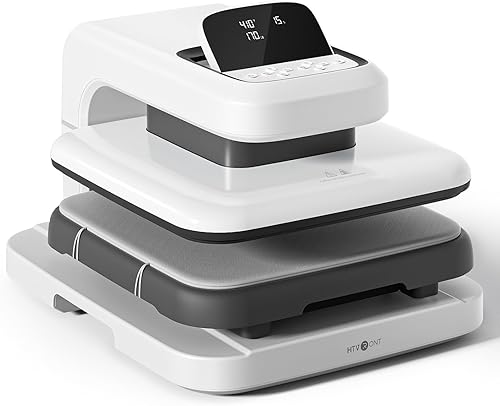
- 15 x 15 in platen
- Adjustable pressure up to 170 lb
- Project height up to 1.77 in
- Auto release
The newer automatic version adds adjustable pressure up to 170 lb and room for projects up to 1.77 in high. Choose it if those controls matter more than the first model's 1 in project thickness limit.
Pros
- Pressure adjusts up to 170 lb
- Accommodates projects up to 1.77 in high
- Auto release
Cons
- Higher project clearance may not matter for standard shirt transfers
- Pressure needs to be set for the material and project
It still uses an automatic press and release cycle, so the upgrade doesn't require a switch to manual operation. Its screen adjusts to seven angles from 0° to 75°, which can help you find a comfortable viewing position at your work surface.
| Detail | Auto Heat Press 15x15 | Auto Heat Press 2 15x15 |
|---|---|---|
| Platen | 15 x 15 in | 15 x 15 in |
| Project capacity | Up to 1 in thick | Up to 1.77 in high |
| Pressure control | Automatic thickness adjustment | Adjustable, up to 170 lb |
| Automatic release | Yes | Yes |
Read our HTVRONT Auto Heat Press vs Auto Heat Press 2 comparison for a closer look at which set of controls fits your work. If you mostly press standard shirts and totes, the original may cover your needs without the added clearance and pressure control.
When should you choose a manual press?
Choose a manual press if you want direct control over pressure or prefer an upward-opening or clamshell workflow. These options require you to manage the press cycle, so they suit buyers who value control more than automatic release.
Fancierstudio Digital Heat Press 15x15: Best for manual control

- 15 x 15 in platen
- Electronic time and heat control
- Adjustable pressure
- 0–999 second timer range
A manual upward-opening press with electronic time and heat controls and adjustable pressure. It offers a different workflow from an automatic drawer press.
Pros
- Adjustable pressure
- Electronic time and heat controls
- Upward-opening design
Cons
- Doesn't auto release
- Manual operation requires attention through the press cycle
The Fancierstudio has electronic time and heat controls, adjustable pressure and an upward-opening design. Consider it if you want to set those controls directly and are comfortable staying attentive through each press.
Delclynee 15x15 High Pressure Clamshell: Best for garment threading

- 15 x 15 in platen
- Clamshell design
- Adjustable pressure knob
- Threadable lower platen
A manual clamshell with a threadable lower platen, adjustable pressure knob and fixed base. Consider it if those features fit your work area and pressing routine.
Pros
- Threadable lower platen helps isolate one garment layer
- Adjustable pressure knob
- Audible alert for temperature and timer
Cons
- Lower board is stationary
- Manual operation requires attention through the press cycle
The Delclynee has a clamshell design, adjustable pressure knob and threadable lower platen. Its lower board stays in place, so choose it if threading a garment over a fixed base suits your setup.
For more machines with the same platen size, see our best 15x15 heat presses. The heat press for beginners guide can help you compare workflow and controls before choosing your first machine.
How should you set up the press?
Start with a stable, heat-safe work surface and enough room to load the drawer and handle blanks. The original HTVRONT measures 20 in long, 12 in wide and 16 in high, and weighs 40.3 lb, so plan where it will live before unpacking it.
Place the press where the drawer can slide out without hitting a wall or other equipment. Keep the hot area clear, and avoid placing loose fabric or tools where they could interfere with loading and unloading.
Before each project, check the blank's dimensions, thickness and surface. Center the design, smooth out wrinkles, and keep seams, buttons or pockets from creating an uneven stack beneath the transfer.
Use the instructions for your HTV, sublimation transfer or other material to choose temperature, time and pressure. The press's range doesn't provide a universal setting for every combination of material and blank.
Our guides to HTV temperature and time and sublimation temperature and time cover common starting points.
What mistakes can spoil a transfer?
The most common preventable mistakes are poor alignment, uneven layers and settings that don't match the transfer. Prepare the garment and press before starting the automatic countdown, so the machine isn't left to compensate for a setup problem.
A fold or thick seam under part of the design can make the surface uneven. Smooth the fabric and reposition the garment before pressing.
Use a heat press pillow when you need help lifting seams or details away from the platen. See our guide to heat press pillows for when one can help.
Don't assume that a preset works for a new material. Follow its instructions, and when practical, check the result on a similar spare blank before committing a finished garment.
Also avoid crowding the work area or leaving a hot press unattended. The original has a 15-minute auto-off feature after no operation, but that safety feature doesn't replace careful handling.
Is the automatic press a good match for your workspace?
The drawer-style layout suits a dedicated craft table where you can slide the lower board in and out. Measure the available surface and clearance first, especially if the press will sit beside a wall or other equipment.
Its 120 volt power requirement is intended for a standard US setup. Confirm your work area can support the machine and has a suitable outlet before you commit to a spot.
The original handles shirts, totes, wood signs and ceramic coasters within its size and thickness limits. For larger pieces or a different press style, browse the heat press guide to compare machine formats and project needs.
Which HTVRONT Auto Heat Press should you buy?
Pick the original HTVRONT Auto Heat Press for routine transfers up to 1 in thick when automatic release is your main priority. Pick the Auto Heat Press 2 if you need adjustable pressure or room for projects up to 1.77 in high.
Choose the Fancierstudio if you want an upward-opening manual press with adjustable pressure, or the Delclynee if a threadable lower platen and fixed base fit your work. For the right HTVRONT auto heat press review decision, start with the thickness and pressure needs of your next projects, then compare the workflow and workspace each machine requires.
Frequently asked questions
Does the HTVRONT Auto Heat Press 15x15 adjust pressure?
The first HTVRONT Auto Heat Press adjusts to project thickness up to 1 in, but it doesn't have a manual pressure control. If you need to set pressure yourself, compare the Auto Heat Press 2, which adjusts pressure up to 170 lb, or a manual press with adjustable pressure.
Follow your transfer material's instructions for the pressure it needs.
How thick a project can the first HTVRONT Auto Heat Press press?
The first HTVRONT Auto Heat Press handles projects up to 1 in thick. Measure the full loaded project, including layers beneath the transfer, before pressing.
For taller items, the Auto Heat Press 2 accommodates projects up to 1.77 in high, so check the complete project height against that limit.
Does the HTVRONT Auto Heat Press release automatically?
Yes. The first HTVRONT Auto Heat Press releases when the timer ends.
Its slide-out drawer lets you position a project away from the heating plate.
The machine shuts off after 15 minutes without use.
Stay nearby and handle the press carefully while its heating plate is hot.
What is the difference between HTVRONT Auto Heat Press and Auto Heat Press 2?
The Auto Heat Press 2 adds adjustable pressure up to 170 lb and clearance for projects up to 1.77 in high. The first model auto-adjusts for projects up to 1 in thick.
Both automatically press and release.
Choose by whether your work needs the second model's pressure control or added height.



