Gecko vs PowerPress Heat Press: Which Is Better? (November 2026)
For most home crafters, the Calogy Mini Heat Press is the better buy for small, detailed transfers, while the Fancierstudio Digital Heat Press 15x15 wins when you need full-size shirts. In this gecko heat press vs powerpress comparison, plate size and workspace matter more than the badge on the box.
On this page (9 sections)
- Gecko vs PowerPress heat press: the quick verdict
- The two side by side
- Which plate size fits your projects?
- Which press gives you better temperature control?
- Which is easier to use day to day?
- Which press suits hats, bags and curved items?
- Which press suits shirts and bulk runs?
- Who should buy which?
- The verdict
For most home crafters, the Calogy Mini Heat Press is the better buy for small, detailed transfers, while the Fancierstudio Digital Heat Press 15x15 wins when you need full-size shirts. In this gecko heat press vs powerpress comparison, the plate size and the controls decide the winner for your projects.
Both machines do the same core job: heat a transfer onto fabric with pressure and time. They split sharply on how much surface they cover and how much control you get over the settings.
That makes the choice less about brand loyalty and more about what you actually press.
This comparison looks at plate size, temperature range, controls, workspace and the projects each machine handles well. Then it names a clear pick for each type of crafter.

 Best for full-size shirts and bulk work
Fancierstudio Digital Heat Press 15x15
Gecko vs PowerPress heat press: the quick verdict
Pick the Calogy Mini for small, curved or detailed work, and the Fancierstudio 15x15 for full shirt fronts and batch runs. The Calogy Mini earns the higher score because it is easy to use and covers the small jobs that trip up beginners.
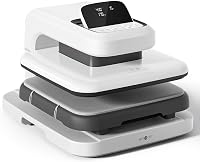
The Calogy Mini packs a 2.87 by 4.43 inch plate into a body about the size of a phone. It heats to 284 F in roughly 3 minutes and runs on 300 watts.
For hats, socks, bags and patches, that small plate is an advantage, not a limit.
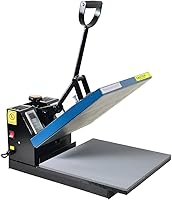
The Fancierstudio 15x15 covers a full shirt front in one press. Its 1800 watts and digital controls give it the reach and precision a garment shop needs.
It just asks for far more table space and a serious outlet.
Neither machine replaces the other for every job. Most crafters who press a mix of items end up wanting both, but if you buy one first, buy for the projects you do most.
The two side by side
The Calogy Mini is the small, simple press and the Fancierstudio 15x15 is the large, adjustable one. The table below sums up the specs that separate them.
| Feature | Calogy Mini Heat Press | Fancierstudio Digital Heat Press 15x15 |
|---|---|---|
| Heat plate | 2.87 x 4.43 in | 15 x 15 in |
| Temperature range | 284 to 356 F | 0 to 699 F |
| Temperature steps | Three presets | Digital control |
| Timer | None | Electronic time control, 0 to 999 s |
| Power | 300 watts | 1800 watts |
| Controls | One button | Digital panel |
| Safety features | Insulated base, auto power off in 15 mins | Teflon-coated platen, adjustable pressure |
| Best projects | Hats, bags, patches, socks | Shirts, bulk runs, large designs |
The gap in plate size is the headline. A 15-inch plate covers a whole adult shirt, while a plate under 5 inches wide covers a corner of one.
The smaller plate does what the big one cannot: it reaches around curves and into tight spots.
The temperature ranges tell a similar story. The Calogy's three presets are set for common craft materials.
The Fancierstudio's 0 to 699 F range lets you dial in exact heat for transfer types that need it.
Which plate size fits your projects?
Choose the 15-inch plate for shirts and large flat designs; choose the mini plate for curved items and small patches. Your most common project should decide the plate size, not the occasional one.
A full adult shirt front needs a plate around 15 inches so the design presses in a single pass. Press a big design in sections with a small plate and you risk a visible seam where the passes meet.
The Fancierstudio 15x15 covers that front in one go.
The Calogy Mini's 2.87 by 4.43 inch plate is built for the jobs a big press fumbles. Hats, cap fronts, tote handles, socks and small patches sit on curves that a flat 15-inch platen cannot hug.
The mini press follows the curve and presses cleanly.
Think about what you made last month. If it was mostly shirts and hoodies, the Fancierstudio is the right tool.
If it was hats, patches and small gifts, the Calogy will frustrate you less. Our guide on HTV vs sublimation helps you match the method to the material before you commit to a press size.
Which press gives you better temperature control?
The Fancierstudio gives you exact digital settings; the Calogy gives you three easy presets. More control suits varied materials, while presets suit beginners who want to press without studying a manual.
The Calogy Mini runs three temperature levels: 284 F, 320 F and 356 F. One button cycles through them, and pressing it three times switches the unit between Celsius and Fahrenheit.
A real-time LED display keeps the current temperature visible.
Those three levels cover a lot of common craft vinyls and fabrics. They also mean you cannot dial in a custom temperature when a material asks for something in between.
For a beginner, that limit keeps things simple.
The Fancierstudio offers digital heat control from 0 to 699 F and a time range from 0 to 999 seconds. You set the temperature and time on the panel rather than choosing from presets.
That precision matters when you press a mix of transfer types that each want a different setting.
If you press one material all the time, the Calogy's presets save you fiddling. If you press several materials and want repeatable results, the Fancierstudio's controls earn their keep.
Our Delclynee heat press review looks at another option with digital settings if that is what you are weighing.
Do the temperature ranges cover your materials?
The Calogy tops out at 356 F. That covers most HTV, many craft vinyls and light sublimation on small blanks.
Materials that need higher, steadier heat will fall short.
The Fancierstudio reaches up to 699 F on its control range and lists an upper temperature rating of 500 F. That wider spread lets you press heavier transfers and materials that want more heat.
Check each material's instructions and set the press accordingly.
Which is easier to use day to day?
The Calogy Mini is simpler to run and store; the Fancierstudio needs more setup and space. Ease of use depends on whether you press once a week or run a small shop.
The Calogy has a single button. Press it once to raise the temperature, twice to lower it and three times to switch units.
The handle is shaped to sit comfortably in your hand, and the whole unit weighs about 0.65 kg.
Its insulated base and auto power off after 15 minutes of inactivity make it forgiving for casual use. Set it down hot without worrying, and forget to switch it off without much risk.
The Fancierstudio is a different animal. It is an upward-opening press that saves space when closed but still measures 33 x 23 x 20 inches and weighs much more than the mini.
It needs a sturdy table or a dedicated stand and an outlet that can handle 1800 watts.
Day to day, the Calogy wins for quick jobs and small spaces. The Fancierstudio wins when you set up once and press a stack of shirts.
If you want automated pressure and timing instead of manual work, our comparison of the HTVRONT Auto Heat Press vs Auto Heat Press 2 covers that route.
Which press suits hats, bags and curved items?
The Calogy Mini is the clear pick for hats, bags and curved items. Its small plate and light body let you press where a full-size machine cannot reach.
A 15-inch flat platen presses flat fabric well. A cap front or a tote handle curves away from the plate, so a large press leaves parts of the design unsealed.
The Calogy's 2.87 by 4.43 inch plate fits onto those curves and lets you press in place.
The Calogy also handles unusually small or unique projects. Its three temperature levels cover the common craft materials used for patches, small decals and personalized gifts.
You can press a name onto a sock or a logo onto a mask without dragging out a big machine.
The Fancierstudio can press small items too, but its size works against it here. Lining up a tiny patch on a huge plate is fiddly, and the plate's heat spreads wider than the design needs.
For curved and small work, the mini press is the practical tool.
Which press suits shirts and bulk runs?
The Fancierstudio 15x15 is the pick for full shirt fronts and batch work. Its large plate and digital controls make repeated garment presses faster and more consistent.
A 15 by 15 inch plate covers a standard shirt front in one press. That means one even result instead of several overlapping passes.
For a small shop or a school club making a run of shirts, that consistency matters.
The digital time and heat controls let you set a repeatable recipe and press shirt after shirt the same way. The Teflon coating on the platen helps protect prints from sticking and scuffing.
Adjustable pressure lets you tune the press to the fabric.
The Calogy cannot match that reach. Pressing a full shirt front with a plate under 5 inches wide means moving the press across the fabric in sections.
The seams between passes can show, and the job takes far longer. For garments at volume, the Fancierstudio is the right machine.
Who should buy which?
Buy the Calogy Mini if you craft small, curved or detailed items in a small space; buy the Fancierstudio 15x15 if you press shirts and run batches. The project list, not the brand name, should make the call.
Choose the Calogy Mini if you make hats, bags, patches, socks and personalized gifts. It suits a kitchen table, a small craft room or anyone who wants to press without reading a long manual.
The one-button control and three presets keep it beginner-friendly.
Choose the Fancierstudio 15x15 if your projects are shirts, hoodies and large flat designs. It suits a dedicated craft space and anyone who presses several items in one sitting.
The digital controls and wide temperature range handle a mix of transfer types.
If you do both kinds of work and can only buy one machine first, buy for your main project. Add the second press later when the volume justifies the space.
Our comparison of the Delclynee heat press vs. VEVOR heat press gives you another large-press option to weigh against the Fancierstudio.
The verdict
The Calogy Mini Heat Press wins for most home crafters, and the Fancierstudio 15x15 is the better pick for shirt work and bulk runs. That is the short answer to the gecko heat press vs powerpress question: match the plate to the project.
The Calogy scores higher because it is simple, compact and genuinely good at the small jobs that frustrate a big press. For hats, bags, patches and quick personalized gifts, it is the machine to reach for.
The Fancierstudio is not the lesser machine; it is the specialist. When you need a full shirt front in one pass or a repeatable recipe for a batch of garments, its 15-inch plate and digital controls do the job the mini cannot.
Pick the Calogy Mini if your crafts are small, curved or occasional. Pick the Fancierstudio 15x15 if you press shirts and value precision over counter space.
For a buyer weighing a large press, the Delclynee vs VEVOR comparison is the next read before you decide.
Our score weighs specs, features and how well each press fits what a home crafter wants: an easy press for everyday projects with room to grow.
Frequently asked questions
Is Gecko or PowerPress better for beginners?
A small one-button press like the Calogy Mini is easier for a beginner because there are only three temperatures to learn. A large digital press like the Fancierstudio 15x15 asks you to set time and temperature yourself, which takes a little more practice but gives more control.
What size heat plate do I need for a t-shirt?
A full adult shirt front usually needs a plate around 15 by 15 inches so it presses in one pass. Smaller plates mean moving the press in sections, which risks uneven results.
For hats, bags and patches, a plate under 5 inches wide is easier to place.
Can a mini heat press handle sublimation?
A mini press with a top temperature of 356 F can handle light sublimation on small blanks like coasters and keychains. Larger sublimation projects and many polyester shirts need higher, steadier heat, so a full-size digital press is the safer choice for those.
How long does a heat press take to warm up?
The Calogy Mini reaches 284 F in around 3 minutes and moves up in about 40 to 50 seconds per step. A large press like the Fancierstudio takes longer to reach high temperatures because its plate is much bigger.
Let any press settle at the set temperature before you start.
Do I need a separate press for hats and shirts?
No single plate size does both jobs equally well. A 15-inch plate is built for flat shirt panels, while a small plate like the Calogy's 2.87 by 4.43 inches fits around a cap or a tote handle.
Many crafters keep a mini press for curved items and a large press for garments.