Is the Cricut Mug Press Worth It?
Yes, the Cricut Mug Press is worth it if you want repeatable, dishwasher-safe custom mugs without setting temperature or pressure by hand. It suits crafters who will make mugs regularly and stick with Cricut's Infusible Ink blanks. Skip it if you want a press that also handles shirts, totes or hats.
On this page (10 sections)
- What does the Cricut Mug Press actually do?
- How does the Cricut Mug Press differ from a standard heat press?
- Who should buy the Cricut Mug Press?
- Who should skip it?
- What do you need besides the press?
- Is the Mug Press easy to use for beginners?
- Do you need to update the firmware?
- How do Mug Press results compare to vinyl or print shops?
- Is it worth it if you already own a heat press?
- So, is the Cricut Mug Press worth it?
Yes, the Cricut Mug Press is worth it for crafters who plan to make personalized mugs more than once or twice. The press takes the guesswork out of mug sublimation: you attach an Infusible Ink design to a blank and let the machine's one-touch setting do the rest.
The "cricut mug press worth it" question really comes down to whether your projects are mugs, and whether you'll keep buying Cricut's blanks and inks.
It is not a general-purpose heat press. It's a single-purpose machine for cylindrical mugs in the 11 oz to 16 oz range.
That narrow focus is both its strength and its limit.
What does the Cricut Mug Press actually do?
The Cricut Mug Press is a dedicated mug press that applies Cricut Infusible Ink designs to compatible ceramic blanks. It uses a patent-pending curved heat plate with zone heating to wrap heat evenly around the mug.
You create a design with Infusible Ink Transfer Sheets, Pens or Markers, attach it to the blank, load the mug and press.
The result, according to Cricut, is a design that becomes one with the mug rather than sitting on top like vinyl. Cricut says the finished designs are peel-proof and dishwasher safe.
There are no manual temperature or pressure settings. You don't dial in a number and time the press yourself; the machine's one-touch setting handles the heat cycle.
That's the core convenience the machine sells.
The press tops out at 400°F and runs on 120 volts. It carries a 1-year manufacturer warranty.
Adult use only, in a well-ventilated area, since vapor is emitted during heat transfer.
How does the Cricut Mug Press differ from a standard heat press?
The main difference is shape. A standard heat press uses flat platens to press shirts, totes and other flat blanks.
The Mug Press has a curved heating element built for mugs, so it can wrap heat around a cylinder that a flat press can't grip.
If you already own a flat heat press and only want the occasional mug, a mug attachment or a wrap-style press may cover you. But for someone whose main project is mugs, the dedicated machine is simpler to load and less fussy than fitting a curved blank into a flat press.
Our guide to what a heat press is and how it works explains the flat-press basics if you're still deciding between machine types. The two tools aren't interchangeable: a Mug Press won't press a hoodie, and a flat press won't wrap a mug's curve without an attachment.
Who should buy the Cricut Mug Press?
Buy it if mugs are the project you'll repeat. The press makes most sense for gift makers, small sellers and teachers who want consistent results across many mugs without learning temperature and pressure by trial and error.
It also suits anyone already inside the Cricut ecosystem. The press is designed as a companion to Cricut smart cutting machines, and it's optimized for Cricut's Infusible Ink products.
If you already cut designs on a Cricut, the Mug Press slots into the workflow you know.
The bundle includes the press plus 12 blank ceramic mugs at 12 oz each. That's enough to practice and still have blanks left for gifts.
Cricut rates the press for blanks from 11 oz to 16 oz.
Who should skip it?
Skip the Cricut Mug Press if you want one machine for everything. A flat heat press covers shirts, totes, hoodies and more, and the Mug Press does none of those.
If you plan to press fabric projects too, put your budget toward a flat press first.
Skip it as well if you don't want to buy into Cricut's ink system. The press is built around Infusible Ink, and regular vinyl or iron-on won't bond the same way.
That's a real ongoing supply cost to weigh against the convenience.
Also skip it if you press only a mug or two a year. The setup, warm-up and blank costs are hard to justify for occasional one-off gifts.
A local print shop may be the cheaper route at that volume.
What do you need besides the press?
You need three things beyond the machine: Infusible Ink supplies, compatible mug blanks, and a way to cut your design. The press itself won't design or cut anything.
Infusible Ink comes as Transfer Sheets, Pens or Markers. The sheets give you full-color printed designs; the pens and markers let you draw directly.
Cricut's guidance recommends following the instructions at its mug-making help pages for each material.
Blanks are the other cost. The press needs smooth, straight-sided ceramic mugs in the supported size range.
Cricut's own blanks are the safe choice, but third-party sublimation blanks in the same size range also work if their coating suits Infusible Ink.
Finally, you need a cutting machine to cut the design. Cricut's smart cutting machines are the natural partner.
If you're new to the ecosystem, price the cutter before committing to the press.
Is the Mug Press easy to use for beginners?
Yes. The one-touch setting is what makes it beginner-friendly.
You skip the temperature and pressure guessing that trips up new heat press users, so your first mugs are more likely to come out even.
The process is short: design in Cricut's software, cut the Infusible Ink, wrap it tight around the blank, load the mug and press. Cricut's zone-heating plate is meant to keep results consistent from mug to mug.
The learning curve that remains is in the design and wrap. A loose or wrinkled transfer shows up in the finished mug, so take care when attaching the ink.
Practice on a blank or two from the bundle before you press a gift.
Safety is part of the routine too. Use the press in a well-ventilated area, keep it away from children, and let mugs cool before handling.
Cricut lists UL, CSA, FCC and IEC conformity and NRTL certifications for its products.
Do you need to update the firmware?
The Mug Press connects to the Cricut design software, and Cricut releases firmware updates from time to time. Keeping the firmware current helps the press talk to your software and can fix connection quirks.
Our walkthrough on how to update firmware on the Cricut Mug Press covers the steps if yours needs it.
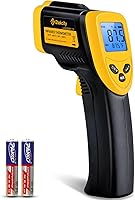
An infrared thermometer like the Etekcity Lasergrip 1080 can help you check how hot a pressed mug or the press surface gets, without touching it. It reads surfaces from -58°F to 1130°F and measures in about 0.5 seconds.
It's an optional extra rather than a must-have. The press runs its own heat cycle, so you don't need to monitor temperature to press a mug.
A thermometer is handy if you like to double-check how quickly mugs cool before handling them.
How do Mug Press results compare to vinyl or print shops?
Infusible Ink results are different from vinyl, and that difference is the main reason buyers choose the press. Vinyl sits on top of the mug and can peel or lift over time; Infusible Ink becomes part of the mug's coating.
Cricut says its designs are peel-proof and dishwasher safe.
A print shop can make custom mugs too, often with a minimum order. The Mug Press wins when you want small batches, fast turnaround and full control over the design.
It also lets you make one mug at a time, which suits gifts.
The trade-off is your time. You design, cut, wrap and press each mug yourself.
At volume the press saves money against per-mug print pricing; for a single mug, the setup and supplies cost more than one shop order.
Is it worth it if you already own a heat press?
Usually not, unless mugs are a big part of your plans. A flat heat press doesn't wrap a mug's curve well without a dedicated attachment, so if you press lots of mugs the Mug Press adds real convenience.
If mugs are a side project, use your flat press with an attachment first.
If you press fabric too, keep reading on how to handle different materials. Our guide on whether you can heat press polyester covers the scorch risks, and how to heat press a hoodie walks through a curved garment project.
The Mug Press is a focused tool. It's worth adding when mug-making is the job, not when it's an occasional experiment.
So, is the Cricut Mug Press worth it?
For most mug-focused crafters, yes. The Cricut Mug Press earns its place when you'll press mugs regularly and want consistent, dishwasher-safe results without manual settings.
The bundle with 12 blanks gets you started, and the 36-count mug case covers the refills.
Buy it if mugs are your main project and you're comfortable buying Infusible Ink supplies. Skip it if you need one press for fabric and flat blanks, or if you only make a mug now and then.
That's the honest answer to whether the Cricut Mug Press is worth it for your craft table.
Frequently asked questions
How long does the Cricut Mug Press take to heat up?
The press warms up before each mug session, and Cricut's guidance walks you through the ready light. Plan to let it come to temperature while your design is already attached to the mug, so the press and the blank are both ready at the same moment.
Do you need Infusible Ink for the Cricut Mug Press?
Yes, the press is built around Cricut's Infusible Ink Transfer Sheets, Pens and Markers. Regular vinyl or iron-on won't bond the same way, so buy the ink supplies for your design before you start.
The press works with mug blanks sized 11 oz to 16 oz.
Can the Cricut Mug Press press anything besides mugs?
No. It's a dedicated mug press with a curved heat plate made for cylindrical blanks.
For shirts, tote bags, hoodies and flat projects you need a separate heat press.
See our guide to what a heat press is to compare the two machine types before you buy.
Are mugs made with the Cricut Mug Press dishwasher safe?
Cricut says Infusible Ink designs on compatible blanks come out peel-proof and dishwasher safe. Wash them as you would any ceramic mug.
Let the mug cool fully after pressing and avoid scrubbing the design with abrasive pads.
Do I need a Cricut cutting machine to use the Mug Press?
You need a way to cut your Infusible Ink design, and Cricut's cutting machines are the natural partner. The Mug Press is designed as a companion to Cricut smart cutting machines.
You still need Infusible Ink sheets and a compatible mug blank to press.