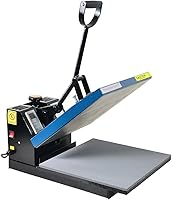
7 Best Portable Heat Presses for Small Spaces (October 2026)
The best portable heat presses for small spaces include the Cricut EasyPress SE 12x10 for larger shirts, the HTVRONT 12x10 Pressure Display Press for pressure feedback, and the HTVRONT 10x10 Pressure Display Press for compact workbenches.
On this page (7 sections)
- Which portable heat press fits a small craft space?
- How should you choose the plate size and press style?
- Which controls and transfer types matter?
- How do you set up and use a portable heat press?
- What common mistakes can affect a transfer?
- How do you care for and store a portable press?
- Which portable heat press should you choose?
The Cricut EasyPress SE 12x10 is the best portable heat press for most small craft spaces if you need a broad plate for shirts, sweatshirts, blankets, or pillows. For a compact desktop, the HTVRONT 10x10 Pressure Display Press has a smaller footprint and shows pressure, time, and temperature.
Portable describes how a press can be moved or stored, but it doesn't tell you how much room the whole machine needs. Compare its body dimensions with your storage spot, then leave clear space to lay out garments and handle a hot plate.
If you're new to pressing, start with our heat press guide to types and sizes and heat press for beginners checklist. The Cricut EasyPress vs a full heat press comparison explains the main format tradeoff.
Our picks at a glance
-
1

-
2

-
3

- 4
 Best for small designsCheck it
 - 5
 Check it
HTVRONT 3-in-1 Auto Press 12x10
Best for hats and mugs - 6
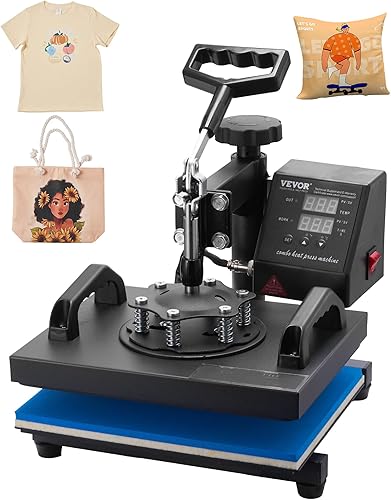 Best for fixed stationsCheck it
 - 7
 Best for basic HTVCheck it
Which portable heat press fits a small craft space?
The Cricut EasyPress SE 12x10 is the strongest all-around fit if you want a large handheld plate, a Heat Guide, and support for several transfer types. Choose a smaller plate when your designs are compact or every inch of storage matters.
We compared plate sizes, machine dimensions, controls, supported transfer types, and the space each press needs. The picks below pair those features with the projects and work areas they suit.
| Product | Best for | Plate | Controls | Uses | Our score |
|---|---|---|---|---|---|
| Cricut EasyPress SE 12x10 | larger shirts | 12 x 10 in | Adjustable heat up to 400°F | HTV, Infusible Ink, and sublimation | 8.6 |
| HTVRONT 12x10 Pressure Display Press | pressure feedback | 12 x 10 in | Digital pressure, time, and temperature display | 8.1 | |
| HTVRONT 10x10 Pressure Display Press | compact workbenches | 10 x 10 in | Digital pressure, time, and temperature display | 7.7 | |
| Cricut EasyPress SE 9x9 | small designs | 9 x 9 in | Adjustable heat up to 400°F | HTV, Infusible Ink, and sublimation | 7.5 |
| HTVRONT 3-in-1 Auto Press 12x10 | hats and mugs | 12 x 10 in | Shirts, mugs, and hats | 7.2 | |
| VEVOR 12x10 Clamshell Press | fixed stations | 12 x 10 in | Digital time and temperature control | 7.0 | |
| KEINVE 10x10 Portable Press | basic HTV | 10 x 10 in | Timer and LED display | Most HTV | 6.7 |
Cricut EasyPress SE 12x10: Best for larger shirts
- 12 x 10 in heat plate
- Cricut Heat Guide
- Ceramic-coated heat plate
- Works with HTV, Infusible Ink, and sublimation
The largest handheld plate in this group gives larger designs more coverage. Cricut's Heat Guide provides time, temperature, and step-by-step pressing instructions.
Pros
- Largest handheld plate in this group
- Cricut Heat Guide
- Supports several transfer types
Cons
- Needs more work surface than the smaller plate options
The Cricut EasyPress SE 12x10 is the most flexible handheld option here for shirts, sweatshirts, pillows, and other larger fabric projects. Its 12 x 10 in ceramic-coated heat plate gives a larger design more coverage than the 9 x 9 in model.
Cricut's Heat Guide provides time and temperature settings with step-by-step instructions. The press works with HTV, Infusible Ink, and sublimation products.
Cricut describes it as portable and lightweight, though its dimensions still call for a sensible storage spot. Choose it if you want one handheld press for varied transfers and have room for the larger plate.
Skip it if you mainly make small graphics and need the smallest possible plate. The 9 x 9 in EasyPress SE is a better match for that work.
HTVRONT 12x10 Pressure Display Press: Best for pressure feedback
- 12 x 10 in heat plate
- Pressure, time, and temperature display
- Dual handles
- 15-minute inactivity auto shut-off
A pressure display and dual handles give feedback while pressing. Its large plate suits bigger designs, but its body needs a broad work surface.
Pros
- Displays pressure, time, and temperature
- Dual handles
- Large plate
Cons
- Wider footprint than the 10 x 10 in option
The HTVRONT 12x10 Pressure Display Press suits makers who want feedback while applying pressure to a larger design. Its screen displays pressure, time, and temperature, while dual handles provide support and control.
The 12 x 10 in plate fits larger designs on shirts, hoodies, pillows, and bags. HTVRONT says the heating system reaches 212°F in the first minute, and an audible beep signals when pressing is complete.
Its 15 x 13 x 7 in body needs a broader footprint than the 10 x 10 in HTVRONT. It includes an insulated safety base and shuts off after 15 minutes without activity.
Choose this model if pressure feedback and plate coverage matter more than saving every inch of bench space. Skip it for a cramped desktop where a smaller press will cover your usual designs.
For a new material, read our guide to heat press pressure settings before pressing.
HTVRONT 10x10 Pressure Display Press: Best for compact workbenches
- 10 x 10 in heat plate
- Pressure, time, and temperature display
- Compact structure
- 15-minute inactivity auto shut-off
The square plate and compact structure suit crowded desktops. Its display shows pressure, time, and temperature.
Pros
- Compact dimensions
- Pressure feedback
- Dual handles
Cons
- Smaller plate than the 12 x 10 in options
The HTVRONT 10x10 Pressure Display Press fits a small workbench when a square plate covers your usual designs. Its dimensions are 12 x 12 x 6.1 in, and the compact structure is designed to take up less desktop space.
The screen shows pressure, time, and temperature. Dual handles support even pressure, while an audible timer signal and 15-minute inactivity shut-off provide clear operating cues.
The 10 x 10 in plate gives less coverage than the 12 x 10 in handheld options. That's a sensible trade if your graphics are smaller and your workspace is tight.
Pick it if you want pressure feedback in a compact body. Skip it if you regularly press large graphics and don't want to reposition them in sections.
Our step-by-step shirt heat press guide covers garment placement and the pressing sequence.
Cricut EasyPress SE 9x9: Best for small designs
- 9 x 9 in heat plate
- Cricut Heat Guide
- Ceramic-coated heat plate
- Works with HTV, Infusible Ink, and sublimation
This smaller plate suits totes, baby clothes, and designs that fit within its pressing area. Cricut's Heat Guide offers step-by-step settings help.
Pros
- Smaller plate for compact projects
- Cricut Heat Guide
- Supports several transfer types
Cons
- Less coverage per press than the 12 x 10 in model
The Cricut EasyPress SE 9x9 fits smaller designs and compact craft areas better than its 12 x 10 in sibling. Its 9 x 9 in ceramic-coated plate suits projects such as T-shirts, totes, baby clothes, and decor.
Cricut's Heat Guide gives time and temperature settings plus step-by-step pressing instructions. The press supports HTV, Infusible Ink, and sublimation, with adjustable heat up to 400°F.
Its 10.52 x 4.7 x 10.52 in body is compact, but you still need room for the garment and a heat-safe place to set the press. Choose it if your designs fit within the plate and storage space is limited.
Skip it if you often press large shirt or sweatshirt graphics. A 12 x 10 in plate covers more area per press.
HTVRONT 3-in-1 Auto Press 12x10: Best for hats and mugs
- 12 x 10 in plate
- Mug and hat attachments
- Adjustable pressure
- Auto shut-off after 15 minutes of inactivity
Dedicated mug and hat attachments add project types beyond flat garments. Its large dimensions suit a craft station with room to stay set up.
Pros
- Includes mug and hat attachments
- Adjustable pressure
- Auto shut-off
Cons
- Largest dimensions in this group
The HTVRONT 3-in-1 Auto Press 12x10 adds dedicated mug and hat attachments to a 12 x 10 in garment press. It suits a maker who needs those formats and has room for a large craft station.
The attachments are designed for quick changes, and the press has adjustable pressure with a display. HTVRONT says the heating system is designed for fast, even heat, and the unit shuts off after 15 minutes without activity.
Its 19.56 x 19.5 x 16.7 in dimensions make it much larger than the handheld options here. Wear the included heat-resistant gloves when changing attachments.
Choose it if you'll use the mug and hat attachments alongside garment pressing. Skip it if your work is limited to flat projects or you need a press that's easy to store between sessions.
VEVOR 12x10 Clamshell Press: Best for fixed stations
- 12 x 10 in pressing area
- Clamshell design
- Digital time and temperature control
- Adjustable pressure
This clamshell has a 12 x 10 in pressing area and adjustable pressure. Its 23.3 lb weight makes it a better fit for a station where it can remain set up.
Pros
- Large pressing area
- Digital controls
- Adjustable pressure
Cons
- Heavier than the handheld presses
The VEVOR 12x10 Clamshell Press suits a fixed craft station better than a setup you pack away after each project. Its 12 x 10 in pressing area, adjustable pressure knob, and digital time and temperature controls support flat projects.
The clamshell handle lowers the upper platen onto the work surface, and the long arm has a non-slip grip. VEVOR describes the swing-away aluminum rod as a burn guard.
At 23.3 lb, this is the heaviest option in the roundup. Its dimensions are 13.3 x 12.2 x 14.5 in, so measure shelf height and the room needed to open it.
Choose this press if you want a clamshell format and a permanent work spot. Skip it if you need to carry the machine from a shelf to a table regularly.
KEINVE 10x10 Portable Press: Best for basic HTV
- 10 x 10 in heat plate
- Timer and LED display
- Auto shut-off after 10 minutes idle
- Compatible with most HTV
A timer and LED display cover basic pressing controls, and the press works with most HTV. Confirm the setup space before arranging a tight desktop.
Pros
- Timer and LED display
- 10 x 10 in plate
- 10-minute idle auto shut-off
Cons
- Compatibility details focus on HTV
The KEINVE 10x10 Portable Press is a simple option for HTV projects that fit its plate. A timer and LED display provide basic controls, and it shuts off after more than 10 minutes idle.
The controls use a temperature and time button with plus and minus settings. The press is compatible with most HTV, making it a focused choice for vinyl designs on shirts, bags, blankets, and pillowcases.
Its 10 x 10 in plate is larger than the stated 8 x 8 x 3 in body dimensions, so plan the actual operating area before arranging a tight desktop. Choose it for straightforward HTV work and simple timer controls.
Skip it if you need pressure feedback or broader stated material compatibility. The HTVRONT display models show pressure, time, and temperature.
How should you choose the plate size and press style?
Match the plate to the designs you make most, then compare the whole machine's dimensions with your work and storage areas. A bigger plate can reduce repositioning, but a smaller body may be easier to store in a shared room.
A 12 x 10 in plate gives more coverage for large shirt designs. A 9 x 9 in or 10 x 10 in plate can suit smaller graphics, totes, and other craft blanks while leaving more room on the bench.
Measure the design and the usable flat area of the blank, not just the garment size. If you plan to press a large design in sections, use the transfer material's directions and position each section carefully to avoid uneven overlap.
Plate size and machine size are different measurements. The HTVRONT 3-in-1 has a 12 x 10 in plate but a body nearly 20 in wide, while the VEVOR clamshell is heavier and needs room for its handle and opening motion.
Handheld models suit makers who store their press between projects or move it between work areas. A clamshell or multi-attachment unit makes more sense when it will stay set up and the added format or controls solve a regular need.
Which controls and transfer types matter?
Choose controls that help you repeat the process you actually use, and check that the press supports your transfer material. The right temperature, time, and pressure depend on the transfer and blank, so use the instructions for both.
Cricut's Heat Guide provides time, temperature, and step-by-step instructions for its EasyPress models. The HTVRONT display presses show pressure, time, and temperature, which suits makers who want visible feedback as they adjust their press.
The KEINVE has a timer and LED display, with compatibility focused on most HTV. Its controls are straightforward, but it is a narrower fit if you plan to work with several transfer types.
Cricut's two models support HTV, Infusible Ink, and sublimation, as does the HTVRONT 12 x 10 in pressure display press. Confirm that your chosen transfer and blank work together, then follow the material guidance for time and temperature.
How do you set up and use a portable heat press?
A good setup gives you a stable, heat-safe surface, room to spread the blank flat, and a place to rest the press between steps. Set out the transfer materials before heating so you don't need to search for tools while handling a hot machine.
Measure the press body, open area, and storage space before you choose a spot. Keep the cord clear of the pressing area, and use an insulated base where the press includes one.
Prepare the blank and position the design according to the transfer instructions. Check that seams, pockets, or thick areas aren't lifting the design away from the plate, since an uneven surface can make pressure harder to apply consistently.
Set time and temperature for the material and blank, then press with even coverage. For multi-section designs, follow the transfer maker's overlap and repositioning instructions instead of guessing at a second press.
When the timer ends, lift the press and handle the transfer according to its peel instructions. Let the machine cool in the way its instructions specify before storing it, and keep the hot plate away from fabric, paper, and other work materials.
What common mistakes can affect a transfer?
Poor placement, uneven pressure, and unsuitable time or temperature can leave a transfer incomplete or damage a blank. Avoid relying on a single setting for every material.
Don't choose a press by plate size alone. A machine that fits the design may still crowd your desk or leave too little room to lay a shirt flat.
Avoid shifting a transfer while the plate is down. If a design needs more coverage than the plate provides, plan sections and reposition carefully using the transfer's directions.
Don't press across thick seams without considering how they change the surface height. Flatten the garment and use a suitable pressing area so the design receives even contact.
Don't assume that a timer, pressure display, or high temperature limit supplies the right setting for every transfer. Follow the transfer and blank instructions, and use the press's guide where available.
How do you care for and store a portable press?
Let the machine cool before putting it away, and store it where the plate and cord won't be damaged. A tidy storage spot also makes it easier to keep the work area clear between projects.
Keep the heat plate free of scraps and transfer residue, following the care directions for the specific press. Avoid abrasive cleaning methods unless the manufacturer says they are safe for that surface.
Use the safety base supplied with the HTVRONT 12 x 10 in and 10 x 10 in models when setting them down. For presses without a stated base, follow their instructions and provide a stable heat-safe resting place.
Store attachments with the HTVRONT 3-in-1 together so you can find the right one before heating. Wear its heat-resistant gloves when changing attachments, as directed.
Which portable heat press should you choose?
Choose the Cricut EasyPress SE 12x10 for broad handheld coverage, a Heat Guide, and support for several transfer types. Pick the HTVRONT 10x10 Pressure Display Press if you want a compact body with visible pressure, time, and temperature.
Choose the Cricut EasyPress SE 9x9 for small designs and tighter storage, or the HTVRONT 12x10 when a large plate and pressure feedback matter more than footprint. The KEINVE is a focused option for basic HTV projects.
Pick the HTVRONT 3-in-1 Auto Press if you'll use its mug and hat attachments and have room for a large station. Choose the VEVOR clamshell if you want a fixed setup; skip both if easy storage is your main priority.
Measure the storage spot and work surface before deciding, then compare the plate with your usual design size. If you're choosing your first machine, our heat press for beginners guide lays out the main features to weigh.
Our top 3 picks at a glance
-
1
-
2
-
3
Frequently asked questions
What size portable heat press should I choose?
Choose a plate that fits your usual design and blank. A 12 x 10 in plate covers more of a large shirt design per press, while 9 x 9 in and 10 x 10 in plates suit smaller graphics and need less work surface.
Measure both the blank and your pressing area before choosing.
Are handheld heat presses suitable for sublimation?
Some handheld presses support sublimation, including both Cricut EasyPress SE sizes and the HTVRONT 12 x 10 in model. Follow the press instructions and the transfer material's time and temperature guidance for each project.
The KEINVE press is described as compatible with most HTV, so it is a narrower fit for sublimation.
Does a portable press need a stand?
Use the insulated safety base with the HTVRONT 12 x 10 in and 10 x 10 in presses, and follow each press's instructions for setting it down. The other presses here do not specify an included base.
Keep the work area clear and use a heat-safe surface.
Can a portable heat press handle hoodies?
Yes, when the design fits the plate and the garment can lie flat in the pressing area. A 12 x 10 in plate gives more coverage, while smaller plates may require careful repositioning.
For seams or thick areas, see our guide to choosing a heat press for hoodies.
How do I choose between a handheld press and a clamshell?
A handheld press is easier to move and store, while a clamshell has a fixed base and handle suited to a dedicated work surface. The VEVOR 12 x 10 in clamshell weighs 23.3 lb, so it takes more effort to put away after each project.
Compare the formats in our Cricut EasyPress vs full heat press guide.